Showing posts with label Reason. Show all posts

Tuesday, June 12, 2012

Loading Audio Into Reason's NNXT Advanced Sampler


I always get asked how to load samples into Reason that have been created in a different digital audio workstation (DAW). I’m going to show how to chop up a piece of audio in Logic and then import it into the NN-XT advanced sampler in Reason.

After I open Logic, I just chose an audio segment to use.


Then I'll export the region as a WAVE file, which is what the NN-XT sampler will be able to play. Highlight the region by selecting it and then simply control-click on it and export. When you are finished, QUIT OUT OF LOGIC. This is so that we don't inadvertently open Reason in Rewire mode. More about that here.


Now to the goodies. Open your Reason session and create a mixer and an NN-XT advanced sampler. You can easily load it from the CREATE menu on top of the window or conveniently by just control-clicking on the black area of the hardware window.


Now load the NN-XT the same way you did it with the Mixer. Make sure the signal flow is set up correctly so you don’t have weird settings messing up your groove! You can do this by pressing the tab button, it will show you the back of the virtual rack where you can verify everything is smoothly running.


Now clear the NNXT by just control-clicking on the device and choosing INITIALIZE PATCH from the menu.


Open the NNXT Remote Editor by clicking in the little arrow at the bottom left side of the device.


Now you can browse for the audio file from Logic and voilá! You have your sample loaded into the NN-XT.


Now you can start playing around with the effects from the ENVELOPES, FILTERS, LFO’S, etc.


You can even add delay to the sample, reverb, scream distortion, the only limit you have is the one you put on yourself.

Have fun!

-by LC Tech Blog contributor José Andrés Márquez 

Thursday, February 2, 2012

Waveform Wednesday: Sampling in Reason - Sound Collage Contest Tips

The Learning Center's Sound Collage Contest has begun! We recorded audio samples of construction sounds, and you can use them to make a piece of music and compete for nearly $3,000 worth of prizes from iZotope and I.K. Multimedia.

Before you start this tutorial, download the samples for the contest (and read the rules and regulations) at this link.

Reason is a powerful tool for sampling. In this tutorial we'll explore the NNXT Advanced, the Kong Drum Designer and the Redrum.

Sampling
A sample is an audio file. Samplers play back audio files in a variety of ways. A sample map determines which MIDI keys trigger which samples, and at what pitch.
Add an NNXT to your Reason rack. Right-click on it and initialize patch (this will dump the patch and all the samples loaded into it), and flip open the NNXT's Remote Editor.

To add samples, click the browse sample button (not the browse patch button) located at the bottom of the screenshot below.


In the SCC5_Download folder, choose an audio sample. Using the Remote Editor, you can have the sample play forward, backward, looped, change the root pitch, start time and more.

Now add a Kong Drum Designer to your rack, and again right-click on it and initialize the patch. Open the Show Drum and FX area, and add an NN Nano Sampler. As with the NNXT, click the load sample button to add an audio sample.

The Kong is great for rhythmic elements, listen through the samples and find some percussive elements to load.

Now add a Redrum device, initialize, and load samples onto the individual tracks.

Using the select buttons on the tracks, the run button, and the trigger buttons, you can create a pattern sequence.

There are Reason classes available! New to the program? Take Reason Essentials. For the topics in this blog post, take Reason Sampling, and Reason Drum Production with Kong. Click here to view our calendar of training sessions. You can also sign up for a music software tutor at this link.

Good luck on your Sound Collage!

-by LC Tech Blog contributor Chris Fitzgerald

Wednesday, November 9, 2011

Waveform Wednesday: Reason Rewire in Digital Performer


Every DAW has its ups and downs.  Have you ever hoped that someone would just combine them into one awesome DAW?  The good news is that you can do this (to an extent).  The better news is that it is really easy to do.  I’m going to show you how to do so in Digital Performer (everyone’s favorite).

Essentially what we are doing is making Reason sync to another DAW. This offers the benefits of DP’s great sequencing and editing capabilities, with the sounds of Reason.  We all know that recording live audio in Reason isn’t possible and sequencing can become quite worrisome.

The first thing we need to do is open DP.  Then we open Reason.  When Reason is opened after another DAW it automatically goes into “slave” mode.  Now it’s simply a matter of “patching” the imaginary chords.

The First thing you want to do is create a few MIDI Tracks for our instruments and one Aux track in order to bring Reason in.  Name the tracks accordingly.

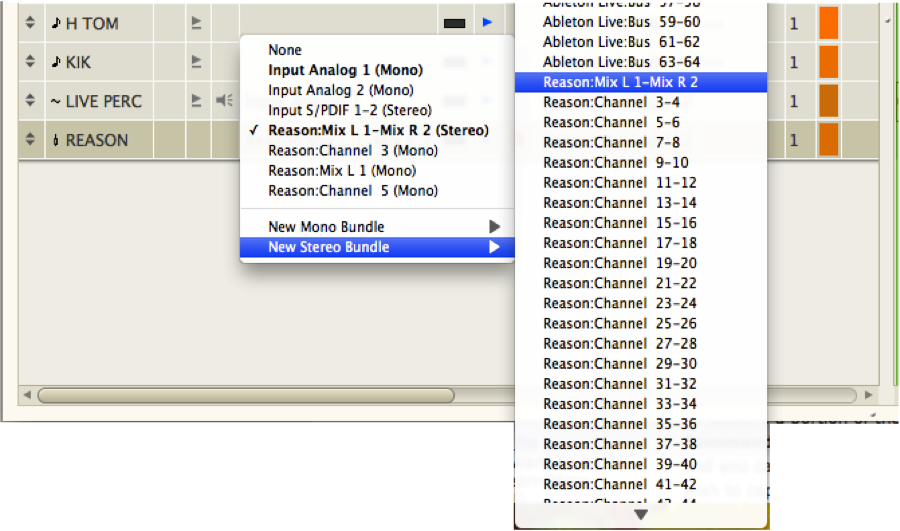
Once we have created the Aux track that we have named Reason we sets its input to Stereo: Reason: Mix L-1-Mix R-2.   We set the output to whatever you are using for output (built-in, mbox, ux2, etc).  This setup allows Reason to be an “instrument” in DP.


Now we go over to Reason.  We’re going to create a Mixer 14:2 and few instruments to go along with it.  NAME THE INSTRUMETNS ACCORDINGLY.  This step is important otherwise it could get very confusing when we began patching reason into our MIDI tracks in DP.

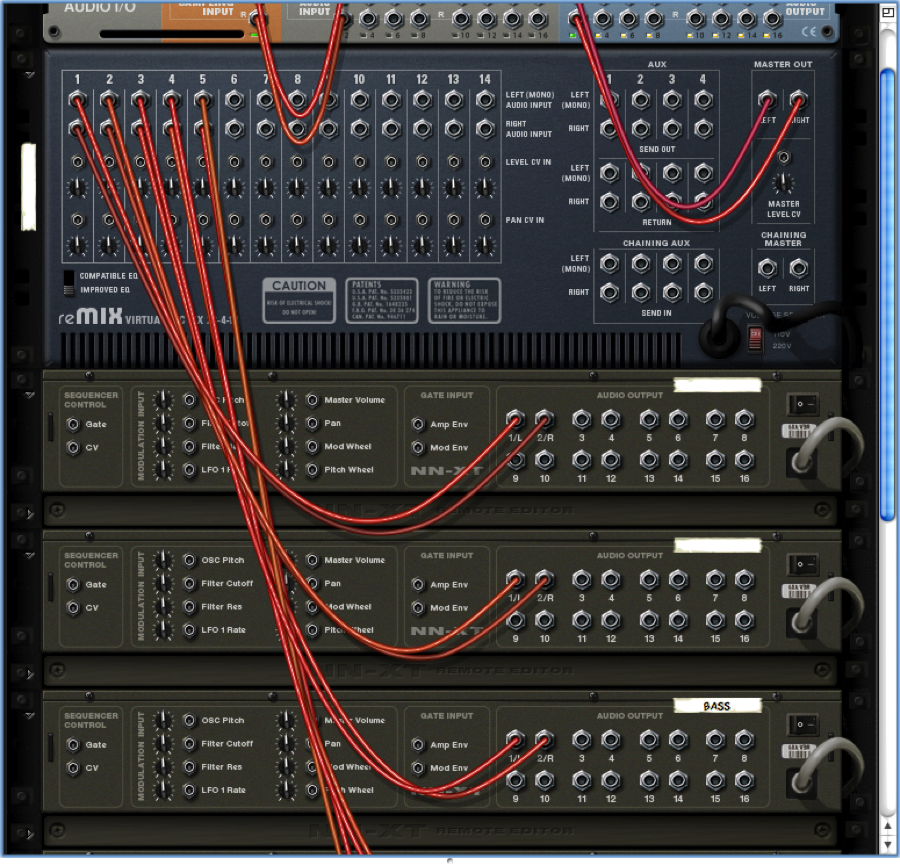
If we press TAB in reason we can see the back of the rack.  You may have noticed that Reason automatically wires itself.  If this has happened go ahead and unwire everything so we are starting from scratch. 

Each of our instruments needs to be patched into the Mixer 14:2.  We take our left and right outs from the first instrument and patch them into the first input.  Named accordingly.  We then take the next instrument and patch that into the second input, and so on and so forth until it looks like this.


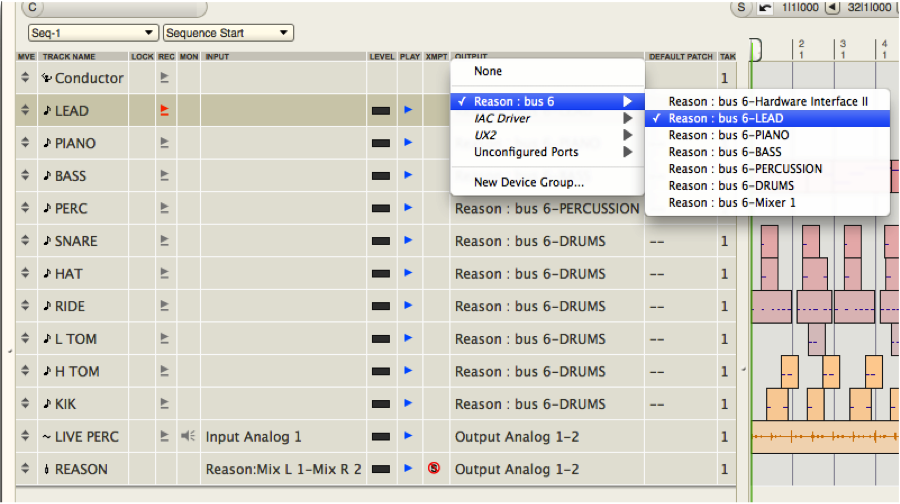
We are good to go in Reason.  Now we go back to DP and set up our MIDI track outputs in order to receive their respective Reason input.  Because we have already done all of the groundwork (AND NAMED THE REASON INSTRUMENTS ACCORDINLY), all you need to do is select the output of our MIDI track and set it to what you need.


Record enable and you're good to go!

-by LC Tech Blog contributor Kai Sorensen

Tuesday, January 11, 2011

Oxygen25 & Reason

In order to use your Oxygen25 keyboard with Reason, you must have the latest driver. Click here to install.


Once installed, go to Reason's preferences


Change to keyboards and control surfaces


and choose auto-detect surfaces


With the driver installed, and the Oxygen25 connected, it will appear as an attached surface.

Sunday, October 3, 2010

"Discovering Reason"

This week is Reason week at the Learning Center, so the blog posts this week will all be offering useful tips, tricks, and resources for beginning through advanced Reason users.

A great place to start learning Reason (other than the Learning Center's Training Sessions!) is Propellerhead's website.  Besides video tutorials ranging from basic to in-depth explanations of each device in Reason, the tutorials section offers a 36 article series entitled  "Discovering Reason."  These articles are great for people with a fairly good understanding of the devices, but who want to amp up their understanding of Reason, and learn new techniques and effects.  

There are tutorials on advanced and creative uses of common devices such as Dr. REX and Redrum, as well as tips on using the less used and understood devices like the Combinator, Matrix, and Spiders.  There are also 16 articles on "Thor Demystified" because who couldn't use some help with that one!

Check out "Discovering Reason" and start exploring the abundant possibilities to make your Reason projects more interesting and unique.

Wednesday, September 15, 2010

Adam Horovitz Interview on Reason

Check out this video interview of Adam Horovitz (Beastie Boys' Adrock) on Proppelerheads' Reason and Record:


http://www.propellerheads.se/substance/artist-stories/index.cfm?fuseaction=get_article&article=adrock

Friday, July 30, 2010

Check out the Propellerhead youtube channel

Propellerhead is releasing 52 Record/Reason video tutorials, one per week. Check them out and subscribe to their youtube channel at:
http://www.youtube.com/user/PropellerheadSW